There are three places you can repeat a workout:
- Repeat on an existing workout, to copy it to new dates.
- Recurrence while creating a new workout.
- Scheduling a workout from your Workout Library.
All three use the same scheduler.
Repeat an existing workout
- Open the workout on your schedule.
- Tap the ⋮ menu and choose Repeat.
- Adjust any details on the Repeat Workout screen.
- Set the recurrence (see below) and save.
Once or repeating
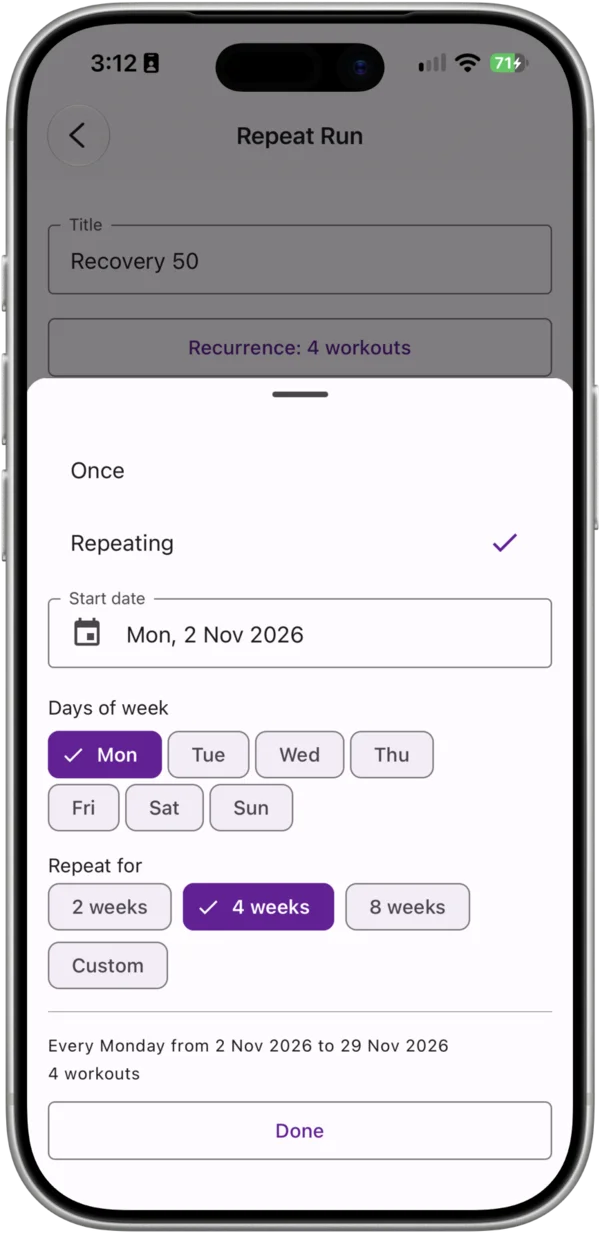
The scheduler has two modes:
- Once — creates one workout on the date you choose. This is the default.
- Repeating — creates a workout on every selected day of the week within a date range.
When repeating, choose:
- Days of week — one or more days. Selecting Tuesday and Thursday schedules the workout on both days every week.
- Start date — the first day the recurrence can start. Defaults to the next occurrence of the day you were looking at.
- Repeat for — 2 weeks, 4 weeks (the default) or 8 weeks, or set an End date for a custom range.
Chiron shows a summary of how many workouts will be created before you confirm, so you can check it before saving.
Things to know
- You can’t schedule a repeating workout to start in the past.
- Each repeat is a separate workout. Editing or deleting one doesn’t change the others.
- A repeating workout is always created as planned, not completed.