Where to find your personal bests
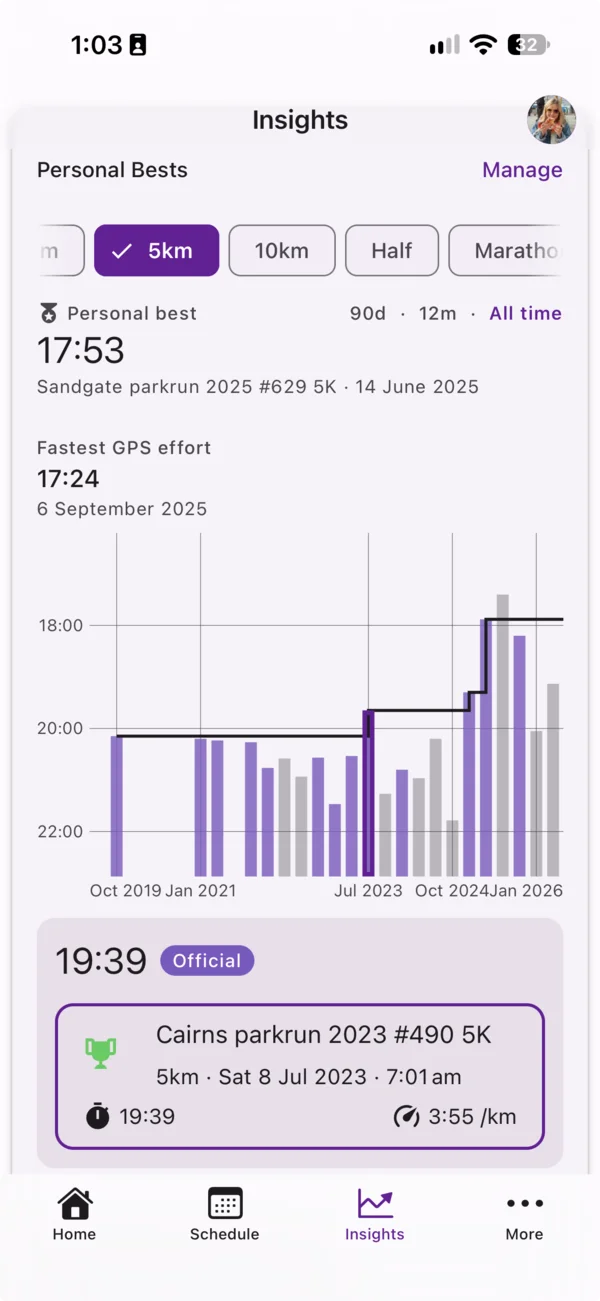
Open the Insights tab. The Personal Bests widget shows your PB and best performances over time for a chosen distance.
Official results and GPS efforts
Chiron uses two kinds of performance:
- Official — a result you’ve recorded against a race event. Chiron uses the net time, or the gun time if there’s no net time.
- GPS — your fastest effort at a distance within a synced workout, for example the fastest 5km inside a long run.
Your personal best at a distance is your fastest official result. A GPS effort is only shown as your PB when you have no official result at that distance. That way a fast segment of a training run doesn’t replace the PB you raced for.
If a workout is linked to a race event with an official result at the same distance, the GPS effort from that workout is hidden so the same race isn’t counted twice.
Using the widget
- Distance — choose 1km, 1 Mile, 3km, 5km, 10km, Half or Marathon. It starts on the distance of your next race, or 5km if you don’t have one.
- Window — 90d, 12m or All time. The chart shows your best effort per week, month or quarter.
- The step line on the chart shows your PB as it stood at each point in time.
- Select a bar to see that effort, including whether it was Official or GPS, and open the event or workout it came from.
Manage your official PBs
Tap Manage on the widget to open Official Personal Bests. It lists each distance with your PB time, date and race.
- Tap a row to open the race.
- For a distance with no official result, tap Add result.
- To bring in many results at once, use Import results. See Importing Race Results in Bulk.
Turning a GPS effort into an official result
If a GPS effort was actually a race, select it in the widget and choose to add a race result. Chiron creates a completed race event linked to that workout.
Coaches
Coaches can view an athlete’s Personal Bests and Official PBs, but can’t add or change results.